【参考:ubuntu 12.10安装OpenGL】
<li>安装编译器和基本函数库</li>
$ sudo apt-get installl build-essential
<li>安装 OpenGL Library</li>
$ sudo apt-get install libgl1-mesa-dev
<li>安装 OpenGL Utilities</li>
$ sudo apt-get install libglu1-mesa-dev
<li>安装 OpenGL Utility Toolkit</li>
$ sudo apt-get install freeglut3-dev
<li>测试(test.c)</li>
#include <GL/glut.h>

void init(void)
{
  glClearColor(0.0, 0.0, 0.0, 0.0);
  glMatrixMode(GL_PROJECTION);
  glOrtho(-5, 5, -5, 5, 5, 15);
  glMatrixMode(GL_MODELVIEW);
  gluLookAt(0, 0, 10, 0, 0, 0, 0, 1, 0);

  return;
}

void display(void)
{
  glClear(GL_COLOR_BUFFER_BIT);
  glColor3f(1.0, 0, 0);
  glutWireTeapot(3);
  glFlush();

  return;
}

int main(int argc, char *argv[])
{
  glutInit(&argc, argv);
  glutInitDisplayMode(GLUT_RGB | GLUT_SINGLE);
  glutInitWindowPosition(0, 0);
  glutInitWindowSize(300, 300);
  glutCreateWindow("OpenGL 3D View");
  init();
  glutDisplayFunc(display);
  glutMainLoop();

  return 0;
}
编译:
$ gcc -o test test.c -lGL -lGLU -lglut
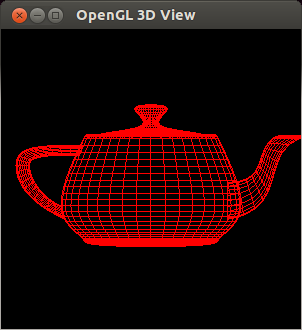
运行结果: